Setup your new InflateM8
- Download the mobile app.
Search your app store for “InflateM8” or use the following links:

- Pair the sensor
Press the button and hold for 2 seconds until the light flashes BLUE. Release the button. If you hold the button for more than 5s, the light will flash RED and the device will turn off again. In this case, just repeat the step and don’t hold the button for longer than necessary.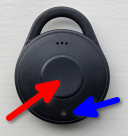
Open the InflateM8 app, grant the necessary permissions and start scanning. The device will appear shortly as shown below: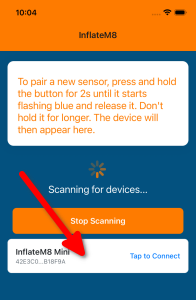
Tap on the device and it will connect to your phone. You should see the sensor details: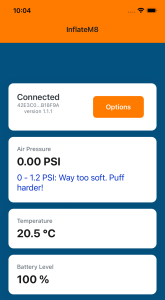
- Update sensor firmware (if available)
If the app says that there’s new firmware available (now or in the future), follow the instructions to update it. It will take less than 1 minute and will ensure that your InflateM8 is operating efficiently. - You’re done! Go paddling!
Use InflateM8
InflateM8 is easy to use, but there are some things to remember.
- Always reset the sensor before inflation
Think of it as the “tare” button on the kitchen scale.
There are two ways to do this, both achieve the same outcome. On the device: briefly push the button on the sensor (there will be a short green flash), do not hold the button.
OR do it in the app (if your sensor is not easily accessible):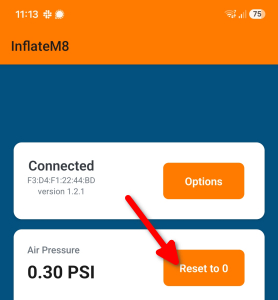
Do not ignore this step – atmospheric pressure changes every day and you want to have the most accurate readings. - Put your sensor inside your raft (in the tubes)
The sensor can be put anywhere inside the tubes. It can be in your backpack, a drybag together with your camping gear, etc. It can be put directly in the tubes, but I’d recommend putting it in a zip-lock bag (just in case you get a puncture and water gets inside). - Inflate your raft and monitor the pressure in the app
The app provides handy hints regarding optimal pressure
Battery replacement
The device uses a standard CR2032 battery and it should last the whole season. When you need to replace it, follow these steps.
- Be careful and patient, don’t force anything until it breaks!
- Use the little pry tool that came with your InflateM8. You can also use a flat screwdriver, but be extra cautious with it.
- Pry open the case at the bottom. Go around the case and pry it open with the same tool. Don’t try to open it like a clam shell, you’d likely break something.
- Replace the battery
- Put it together – start with the button side – slide the board onto the 3 pins. There is only one correct orientation. so if it doesn’t fit, don’t push it, but turn it and try again.
- Put the back panel on – again there’s only one correct orientation. Two small line marks at the bottom of the device should help with alignment. Once aligned, press it together until it clicks.
FAQ
Have a look at the FAQ section.